What is an earth zoom out AI video?
An earth zoom out AI video begins close to a character and rapidly pulls the view back until the planet fills the screen. The person becomes a dot, the surrounding town shrinks into a pattern, and clouds give way to the curve of Earth. It is a dramatic change of scale built from one image. The effect turns a local moment into something enormous, whether the caption is thoughtful, ridiculous, or a little of both.
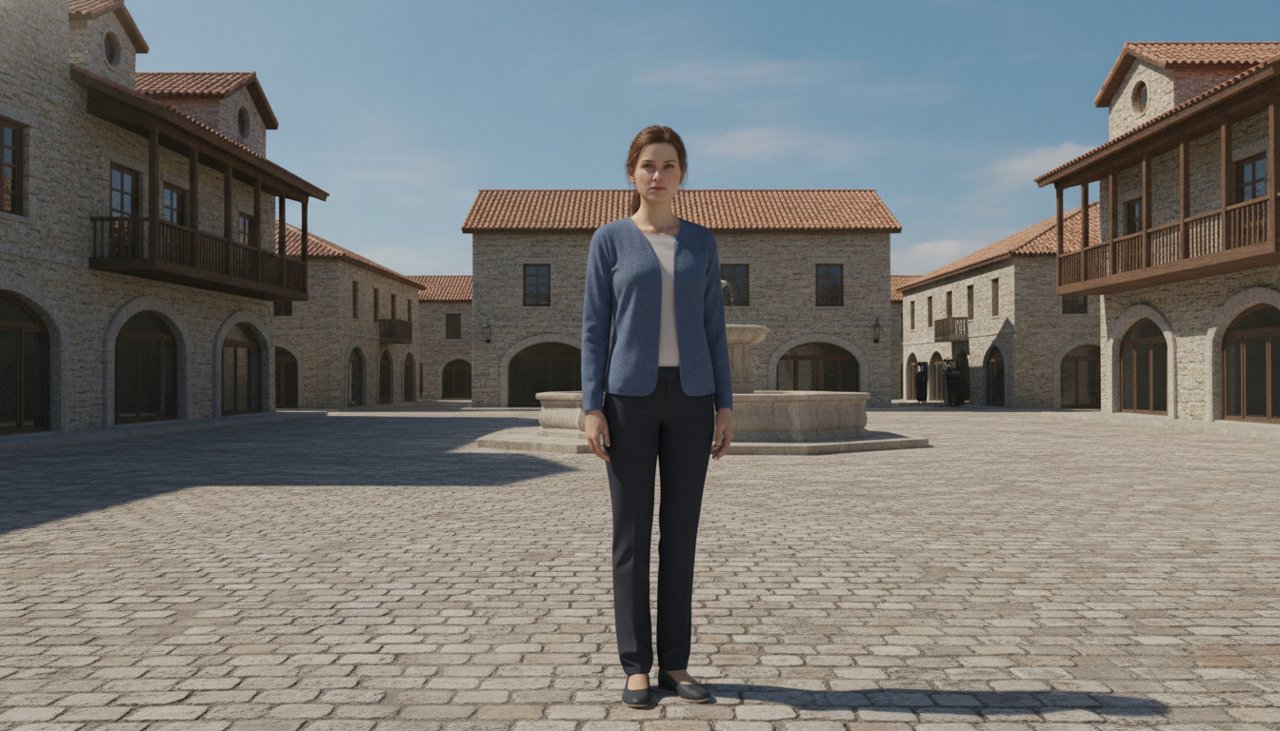
This page uses one style, Street to space. A fictional adult stands still in a fictional town square while the camera makes a single accelerated pullback. The person does not jump, fly, or transform. The movement belongs entirely to the camera, which makes the idea easier to follow in a short clip. The four second action brief compresses the transition into one visual move rather than a sequence of separate scenes or a realistic trip through the atmosphere.
The destination is a generated view of Earth, not a satellite lookup of the source photo. Streets, coastlines, clouds, and the connection between the town and planet are visual interpretations. That is useful for a meme about perspective, but it should not be presented as a geographic measurement. A fictional character named Avery can feel like the center of the universe in the opening frame and become almost invisible a moment later. That shift is the whole story.
How to make the street to space pullback
Start with one fictional adult centered in a simple outdoor setting. A full body view or a wider portrait gives the camera a readable starting point. Leave some ground around the character so the first stage of the pullback has somewhere to expand. A crowded room, close ceiling, or busy group photo adds obstacles that the model would need to reinterpret immediately. An open square makes the imagined route into the sky much easier to understand.
The source does not need to show a real city or a recognizable landmark. In fact, a fictional location helps set the right expectation: this is a cinematic scale effect, not a location tracking service. Keep the character still and let the camera do the work. Asking for a wave, a run, or an outfit change during the pullback would use time that is better spent showing the town disappear and the planet become visible.
- Upload a clear fictional character image with a centered subject, simple surroundings, and enough visible ground to establish the starting location.
- Use Street to space and check the output settings and credit cost. The preset describes one continuous pullback rather than several camera options.
- Generate the clip, then watch the transition at normal speed. Check whether the town, clouds, and planet connect without a distracting jump or sudden change of direction.
- Save the result and add any caption in your editor. Keep geographic claims out of the text unless you have separate evidence that supports them.
When a planet reveal tells the story
The effect is a natural fit for perspective jokes. A fictional character worries about an awkward greeting, and the camera immediately reminds the viewer how large the world is. Another character announces that their tiny snack problem is a global emergency. The visual structure works for both because it creates the same contrast between a personal moment and an enormous backdrop. Choose one clear setup, then let the pullback change the scale of the joke.
It can also introduce an original story that moves from a neighborhood to a much larger world. Begin with the character whose experience matters, then use the planet as a transition into the title or next scene. For a fictional travel concept, the effect can suggest distance and curiosity without claiming to show an actual route. Add real place information separately if your project needs it, and do not treat generated streets or coastlines as reference material for directions.
For social posts, make sure the opening character remains large enough to recognize before the camera accelerates. A long caption can steal the only moment when the face is visible. Place text where it will still work after the background changes from pavement to clouds to dark space. A portrait canvas can preserve the full landscape clip without cutting off the final globe. Preview the complete edit on a phone, since a satisfying planet reveal on a wide monitor may become cramped after a vertical crop.
What does an earth zoom out clip cost?
The effect uses paid credits, with credit packs starting at $9.90. The generator displays the credit charge for the selected model, resolution, and duration before you start. That displayed amount is the useful number for budgeting a clip. The starter pack price is not a universal per video price, and different output settings can use the balance at different rates. Review the selection again if you change the duration after preparing your source image.
No subscription is required for a credit pack. A practical first render tests whether the scale transition reads clearly from beginning to end. If it does, try your caption and layout before buying another variation. If it does not, simplify the source background or give the person more space in the frame. Adding more instructions about named buildings and exact continents is unlikely to solve a transition that is already too crowded for a short visual effect.
Failed renders receive credits back under the site's failure policy. A completed stylized globe that differs from real geography is not the same as a technical failure, since geographic accuracy is not the promise of this preset. Generation often takes about a minute, but queues and output settings can extend the wait. The camera move is designed to fit a four second brief, while the duration selected in the generator controls the actual export length. Leave time to review the transition before publishing.
Why use this earth zoom out preset?
The preset concentrates the entire shot on one change of scale. You do not need to assemble several map clips, animate a simulated drone, or describe a new camera angle for every altitude. The source establishes the person and starting environment, then one continuous movement carries the viewer toward the planet. That simplicity gives the edit a clear beginning and end. It also makes it easier to decide whether the result communicates your idea without extra explanation.
The demonstration uses a fictional adult in an invented town, which keeps the creative concept separate from any claim about a real person's location. There are no coordinates, street labels, or identifiable landmarks built into the prompt. The model still has to invent a large amount of unseen scenery, so the landscape can change in unexpected ways. Check the transition for duplicated blocks, shifting horizons, or a globe that appears abruptly. A smooth zoom should feel like one shot even though the environment is generated.
You control how the final reveal lands. Hold the planet briefly in the edit if the caption needs a beat, or cut directly into the next scene if the zoom serves as an introduction. Avoid covering the final globe with a large title before the viewer has seen it. The strongest version makes the scale change obvious without demanding close inspection. Choose a simple fictional starting scene, review the credit cost, and turn one small character moment into a view from much farther away.